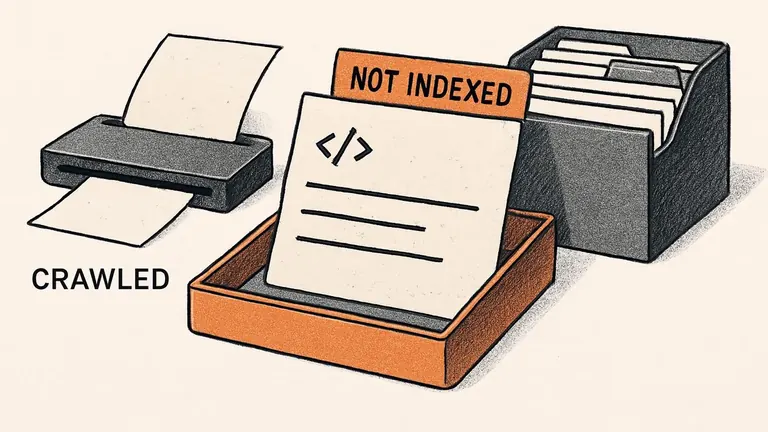


A rank tracker says an important page has fallen out of the top results. Before you rewrite it, ask whether customers saw that change.
That question has become harder to answer. In fall 2026, search-data providers said they had collected Google results that looked normal but differed from what they expected. A tracker can turn those pages into a convincing ranking loss. The chart still loads. The numbers still look precise.
A ranking alert leaves two questions open. Did visibility change for customers, and does the page need a repair? Comparing the same queries, pages, locations and devices across a suitable period helps answer the first. The provider's collection status and Google Search Console can show whether the alert has support. Where the reports disagree, a manual search adds another observation, with limits of its own. A repair should follow evidence of a problem with the site.
| What You See | What It Establishes | Next Check |
|---|---|---|
| A tracker shows a sudden fall | Its collected results changed | Collection status and matched Search Console data |
| The same queries lose position over complete reporting periods | Stronger evidence of a genuine loss | Affected URLs and recent site changes |
| Clicks fall while matched positions hold | Traffic declined, with the ranking cause unproven | Demand, impressions and click-through rate |
| The sources disagree | The diagnosis remains open | Comparable screenshots and a dated recheck |
Why a Rank Tracker Can Report a False Drop
An error message is easier to spot than a full results page with sites you did not expect. Some collection problems leave the familiar Google layout intact. The tracker gets a page it can process, yet that page may show different rankings from those a customer would see.
Nozzle's research, updated November 1, 2026, shows why this deserves attention. It compared collected results with the sites usually present for the same keywords. Its test flagged a result when fewer than half of those usual sites remained anywhere in the collected results. A keyword needed at least 5 baseline observations to qualify, and a usual site had to appear in at least 60% of them.
In the eligible desktop sample judged on both pages, the flagged share reached 64.0% on October 31. The study analyzed 53,298 collected results that day. The finding applies to this sample and the test used to flag results. It is not an error rate for every rank tracker or every Google search. It also does not tell you that your own page lost a real customer-facing ranking.
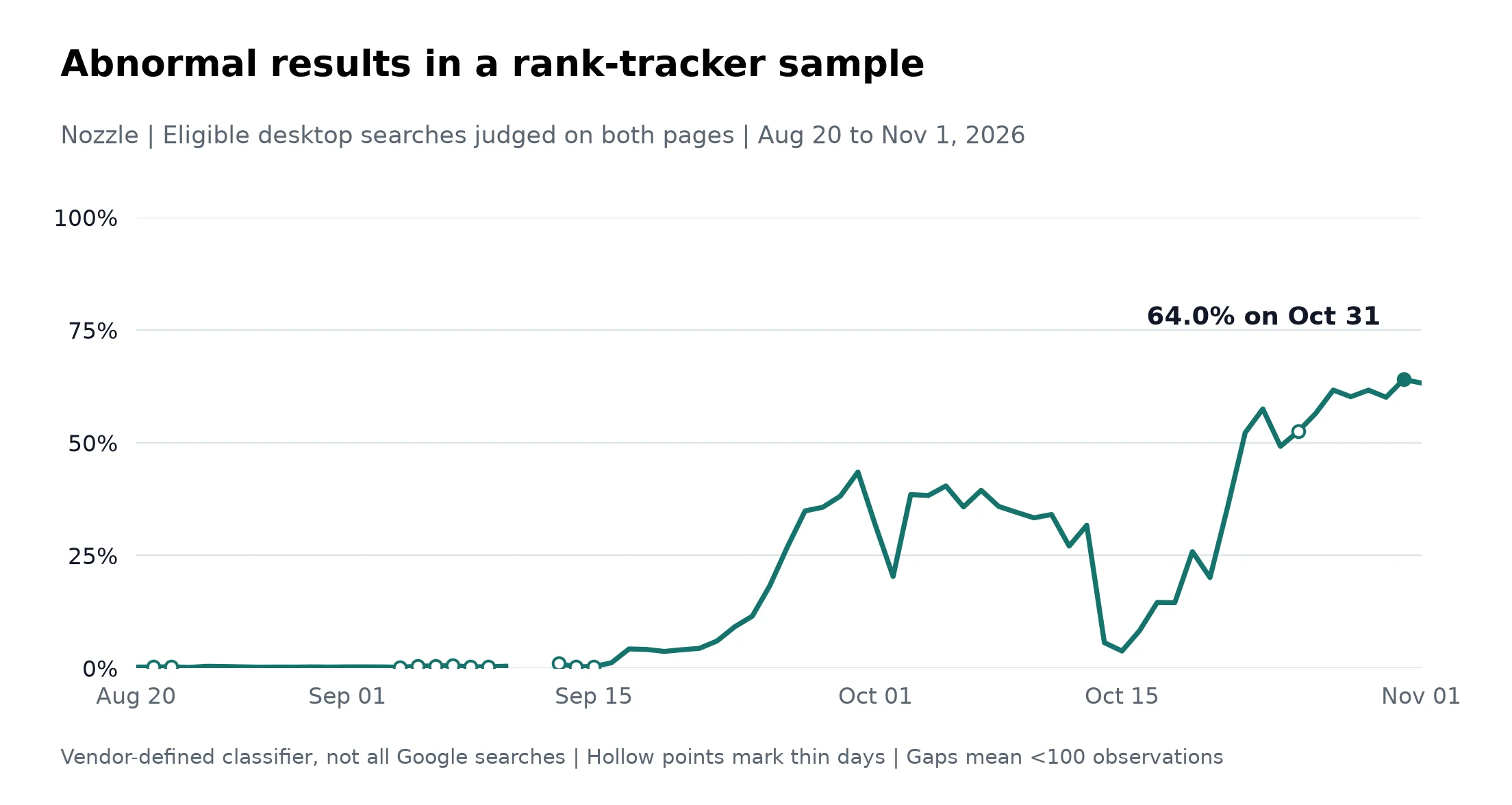
The gaps and hollow points matter. A day with little usable data should not look as reliable as one with a much larger sample. September 11 had no eligible observations. Drawing that as 0% would imply that the results were fine when the study has no data for that day.
Ahrefs and Semrush also published notices about abnormal collected results and steps to reject or replace them. Those reports give you a reason to check your provider. They do not establish that Google confirmed an intentional policy of misleading tracking tools. When you discuss an apparent loss with a colleague or agency, distinguish the observed collection problems from unconfirmed explanations for them.
- Check your provider's incident notices, collection timestamps and data-quality updates for the affected period.
- Save the affected keywords and URLs before changing the website.
- Ask whether flagged or incomplete results will be collected again, and when corrected data should appear.
Define Which Rankings You Think You Lost
A sitewide visibility score can conceal which terms moved and how much they matter. Start with the affected keywords that bring relevant visitors or support important product and service pages. A change from position 3 to 15 on one of those terms deserves a different priority from a change far down the results for an incidental phrase.
Write down the query, the URL you expected to rank, and the before-and-after positions shown by the tracker. Add its search country, location, device and collection date. If a local search was tracked from a city or postal code, retain that detail. A country-level search from elsewhere is a different observation.
A change in the ranking URL can also change the diagnosis. If Google began showing a different page from your site, the original URL's decline does not by itself describe the site's visibility for that query. The replacement might be useful, irrelevant or a duplicate. You need to see which happened before you decide what to fix.
The comparison period matters as much as the query. A single unusually strong day makes a weak baseline. Use complete periods with comparable weekdays, then look further back if the business is seasonal. Also note recent deployments or migrations, since a change in URLs can alter both search behavior and where performance is reported.
- Build a short list of affected query-and-URL pairs, ranked by business relevance.
- Copy the tracker's country, local setting, device and last collection time into the same sheet.
- Record any new ranking URL and the date the change first appeared.
- Set comparable dates before opening another report.
Compare Search Console Evidence
Search Console gives you evidence from Google's reporting about your site, so it can help test the tracker's alert. Its averages still need careful interpretation. Before comparing the numbers, check that you have the right property and search type, along with any known reporting problems affecting those dates.
Check the Same Query and Page
Open the Search results performance report and compare the affected period with your chosen baseline. Filter to an important query, then inspect the page associated with it. Add the relevant country and device. Look at impressions, clicks and average position together.
Average position describes the topmost eligible result for the property or page across the reported impressions. It does not promise that every person saw your page at that numbered spot. This helps explain why a manual result and a reporting average can differ without either being fraudulent.
A change that lasts across complete, comparable days gives you more to judge than a single fresh result. The newest data can still change, and a low-volume query may offer little evidence over a short window. If the period is too small to judge, extend it and record the uncertainty. Do not use the entire site's average in place of the query's limited data without explaining the change.
Separate Position From Clicks and Demand
Fewer clicks do not settle whether rankings fell. If the same query's position stays steady while impressions decline, search demand or a change in the queries reaching your site may be involved. Look further back and check search interest before deciding that the content failed.
If impressions remain similar but clicks fall, examine the results customers see. Titles, snippets and competing search features can change the appeal of a visit. A position number alone cannot describe how much attention a link receives on a crowded page.
The reverse can mislead too. Your overall average position may worsen because new queries begin showing your pages low in the results. That does not establish a decline for the terms you were already targeting. Keep returning to the affected query-and-page pairs rather than asking one sitewide average to answer everything.
- Compare the affected queries within the same country, device and search type.
- Note whether position, impressions, clicks or several measures changed.
- Check recent reporting data again once it is complete, and keep the original comparison dates on the sheet.
What a Manual Search Can Confirm
A manual search lets you look at one result and notice what an average hides. It can show a replacement URL, a different kind of page taking the top results, or a result that bears little relation to the query. Save what you see with the date and search conditions.
A manual search is more useful when its location and device are as close as practical to the tracked settings. A private browsing window can reduce some effects of browsing history, but it does not erase location or make the search universal. Seeing your page once at position 1 cannot prove that all the tracker's observations were wrong.
One term that still looks good tells you little about the rest of the alert. Check several affected terms, including an important commercial query and examples from the affected page group. If possible, repeat the check after the provider refreshes its collection. The aim is to find out where the sources agree and why they differ.
Two tools agreeing can help, but ask whether they get their data from the same place. Providers can rely on upstream collection services. Agreement is stronger when the sources add a different kind of observation, such as Search Console performance for the same query and page alongside a screenshot of the results saved with the date.
- Capture the query, result URL, device, location setting and time with each screenshot.
- Check more than one affected term and retain inconvenient results too.
- Send the provider examples of results that disagree, including the search conditions, then record its response.
Investigate a Loss Backed by Evidence
When matched evidence supports a loss, find out how much of the site it affects. Did one page stop appearing, did a template lose visibility, or did relevant queries decline across the site? The answer tells you which records and people you need.
If the site is down, you do not need to wait for a week's worth of ranking averages. Check whether important pages load and whether a recent release changed redirects, access requirements or indexability. A mistaken noindex instruction can remove a page from search without any competitive change in its quality.
A page report can look empty when performance moves to a different canonical URL. URL Inspection helps you check this for representative affected pages. Compare Google's selected canonical with the URL you expected to appear, and review indexing information alongside the site's current behavior.
If the pages remain accessible and indexed, compare what now ranks for the same queries. Has the kind of result changed? Does a competing page serve the searcher's task more clearly? These questions can justify a content investigation, but the fact that another site is above yours does not identify one specific ranking factor.
Review deployment dates and official ranking-update dates as possible explanations. Timing is a lead to investigate. It cannot prove that an update caused every loss recorded that week. Check Manual Actions and Security Issues where relevant rather than using the word penalty for any decline.
- Check whether the pages load and review recent releases right away if important URLs seem to have disappeared.
- Inspect a few affected URLs and record their selected canonical and indexing status.
- Give the person responsible for the technical or content work the affected page group, the date the loss began and the supporting evidence.
Record What You Found and What to Check Next
The useful result of this investigation is a decision you can explain. You might find evidence of a visibility loss, a likely measurement problem, or a change in clicks or demand. You may also need more evidence before deciding. A likely collection problem needs provider follow-up. A confirmed technical failure needs a repair and a check that it worked. If the sources disagree, check again and record how you made the check. You do not have to claim certainty to take a useful next step, and you should not change several unrelated parts of the site while trying to discover which one failed.
- Assign an owner to the next investigation or repair.
- Keep the evidence sheet with the change record so you can see why the work was done.
- Set a date to revisit the same queries and URLs using the same comparison settings.